
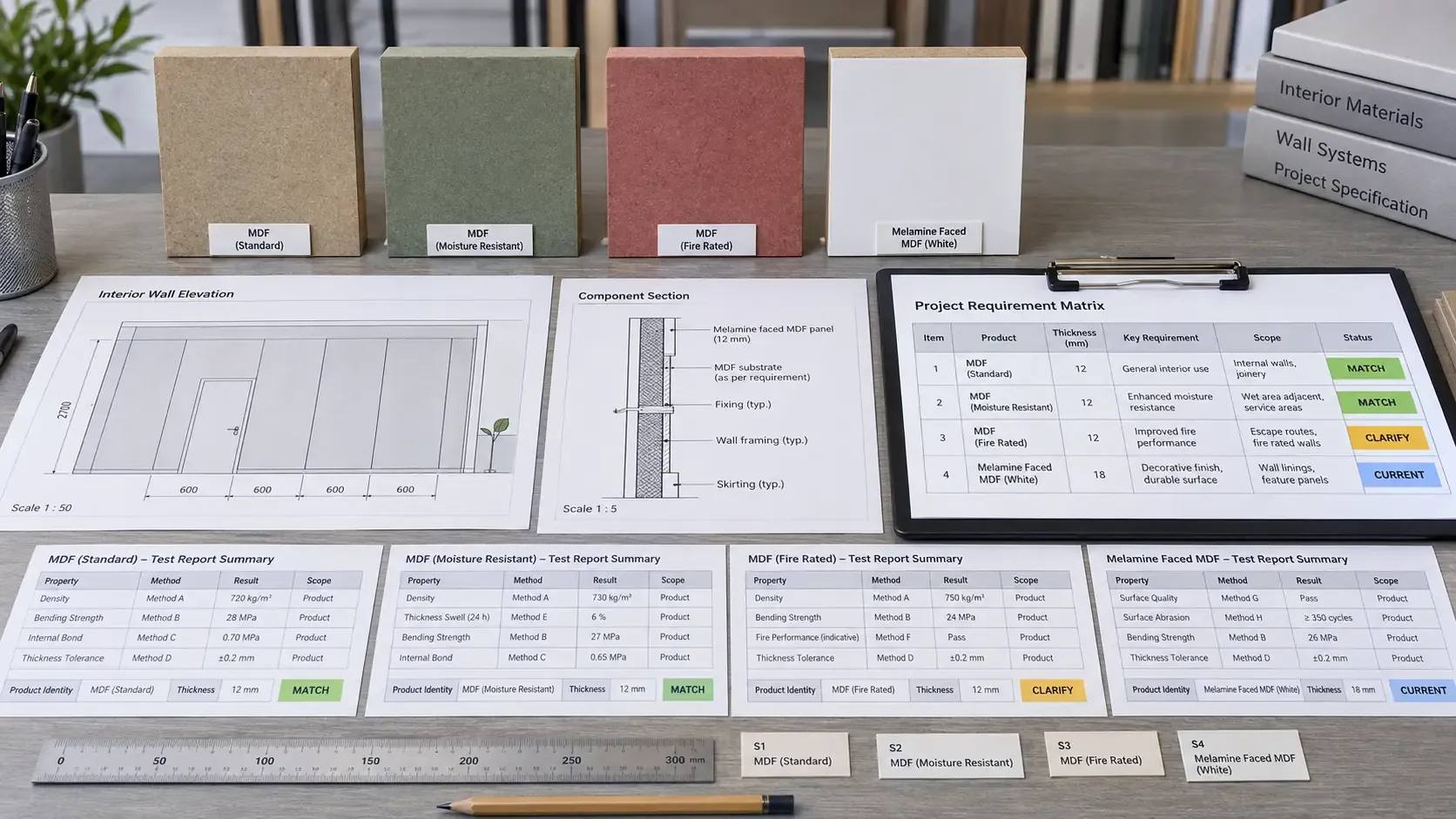
This Procurement Scenario is an educational decision model for a common sourcing situation. It presents a reusable workflow independent of any named CUZI MDF customer project, completed delivery or claimed commercial result.
Interior-project document review connects the design requirement to the exact MDF product, decorative construction, component and installed system. A useful review file shows what the project requires, what the supplier proposes, which document supports each point, where that document applies and who has authority to approve the final selection.
Start with the project requirement matrix
Extract every MDF-related requirement from specifications, drawings, finish schedules, material schedules, room data sheets and contract documents. Record clause or drawing reference, component, location, required property, required document, proposed product, approval party, status and due date. Use stable item numbers so questions, submissions and decisions remain traceable through later revisions.
Map requirements to locations and components
Connect each requirement to a specific wall panel, cabinet, door, vanity component, headboard, furniture item or other defined assembly. Record room type, zone and service condition. A finish code or general note can then be translated into a measurable product, component and installation scope for purchasing and approval.
Separate product, component and system requirements
Identify whether the project requirement applies to the MDF board, a faced or machined component, or the complete installed assembly. Board thickness, density and emission class usually describe the selected product. Decorative appearance, edge construction and hardware describe a component. Fire, acoustic or other project classifications may depend on the complete tested or assessed system and its stated field of application.
Define the exact proposed MDF construction
Record product type, nominal thickness, agreed tolerance, board format, density range, E0/E0.5/E1 destination requirement, face, reverse, decor or veneer reference, texture, gloss, grain direction, edge, machining and supplied finish. Assign a product or construction code and use it across samples, drawings, documents, quotations and pack labels.
Identify every submitted document
Record document title, number where applicable, revision, issue date, issuer, holder, language, page count and source. Preserve the complete file used for review and link it to the requirement-matrix item. A controlled register distinguishes product data sheets, declarations, certificates, test reports, classification reports, drawings, samples and approval records.
Match product identity and construction
Compare the proposed product name, MDF type, thickness, density, face and reverse construction, treatment and sample identity with the description in the supporting document. Record matches, differences and clarification points field by field. Where a report covers a defined range or family, capture the wording and conditions that establish that scope.
Review the method, result and stated scope
For a test or classification document, record the referenced method or standard, specimen construction, conditioning or test basis where stated, measured result or classification, and the document's stated application or limitation. Compare these fields with the project requirement and proposed order. Keep the full context together so a result remains connected to the product and method that produced it.
Check dates, revisions and current status
Review issue date, expiry or surveillance information where applicable, superseded revisions and current issuer status. Confirm which version belongs in the active submittal. Record a future review date for time-sensitive documents so purchasing can confirm status again before production or shipment release.
Verify issuer and document source
Identify the laboratory, certification body, manufacturer or other issuer and the method used to obtain the document. Where the project requires verification, use issuer directories, secure links, contact confirmation or the project consultant's process as applicable. Record the verification date and reviewer in the document register.
Distinguish technical data from conformity documents
A technical data sheet communicates declared product information and typical parameters. A declaration states information under the issuer's responsibility. A certificate confirms the scope described by the issuing scheme. A test report records a specimen, method and result. A classification report interprets results within a stated framework. Assign each document to the requirement it is suited to support.
Keep appearance approval as a separate check
Physical samples establish colour, texture, gloss, grain, veneer matching, edge appearance and visible workmanship according to the attributes recorded on the sample sheet. Technical documents establish their stated product or performance scope. Link both tracks through the same construction code while retaining separate approval statuses and responsible reviewers.
Coordinate drawings with product documents and test reports
Review wall elevations, component sections, fixing details, joint layouts, edges, corner returns, supports and service openings against the proposed MDF construction. A change in thickness, substrate, surface, backing, air gap, fixing or other system detail may affect drawing coordination or document applicability. Record drawing revision beside every product and system review item.
Manage questions through a clarification register
Write each open point as a focused question linked to the exact document page, project clause, product line or drawing detail. Assign the party expected to respond and the date required. Record response, supporting attachment, reviewer decision and status. This produces a visible route from initial gap to closed procurement decision.
Review substitutions through the same matrix
Enter a proposed substitution as a new construction with its own product data, samples, documents, drawings, price and lead time. Compare it against every applicable requirement and assign it its own review status. Maintain both options in the register until the responsible approval party records the accepted process.
Use clear review statuses and approval checkpoints
Useful statuses include received, under review, clarification required, resubmission required, accepted for the stated scope and superseded. Define who can assign each status and what purchasing action follows. Production release should reference the approved construction, current drawings, sample IDs and applicable document set in one controlled record.
Carry approved identity into production and packing
Transfer the construction code, product identity, finish reference, drawing revision and destination group into production orders, inspection records, bundle labels and packing lists. Receiving teams can then compare delivered materials with the approved schedule. Replacement and repeat orders use the same reference chain and record any current revision.
Compare suppliers on document completeness and applicability
Issue each supplier the same requirement matrix, proposed construction format, sample schedule and document list. Compare product fit, document applicability, open clarifications, submission timing, price, lead time, packaging and delivery basis. Keep pending document items visible as quotation qualifications until the responsible project reviewer closes them.
Request an MDF quotation
Send the project requirement matrix, component and location schedule, proposed MDF constructions, drawings, finish references, sample approval sequence, document list, approval parties, packaging, destination and required dates. Use the MDF certificate and test-report review guide for document matching, the Fire Rated MDF document checklist for classification-led review, and request an interior-project document review with the complete submittal register.