
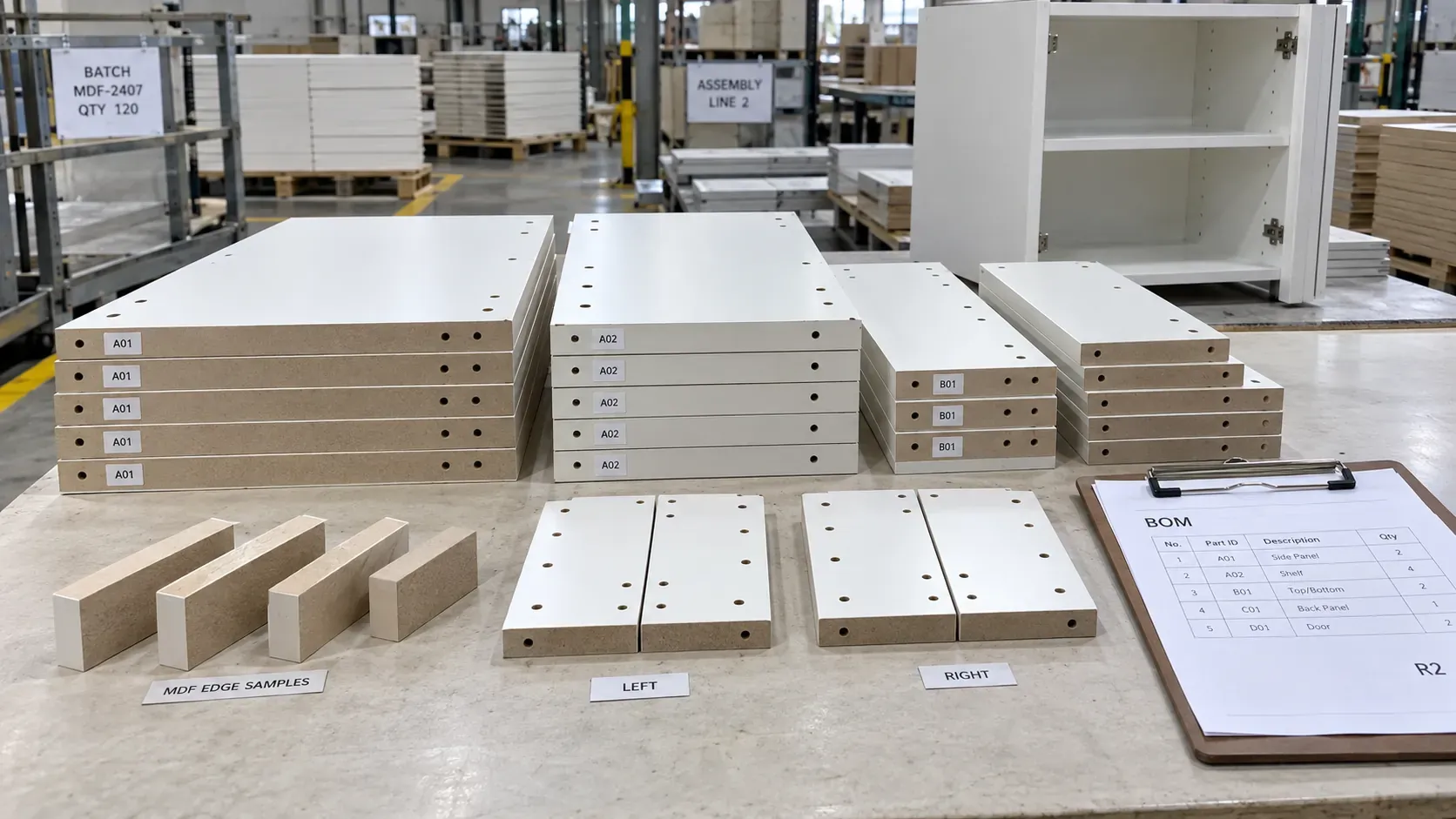
This Procurement Scenario is an educational decision model for a common sourcing situation. It presents a reusable workflow independent of any named CUZI MDF customer project, completed delivery or claimed commercial result.
A repeat MDF component order should reproduce the accepted construction, geometry, finish, hardware interfaces and assembly sequence while making every current change visible. The previous order supplies a traceable baseline; the new purchase order, bill of materials, drawings and samples define the production release.
Start from the current finished-component schedule
List every cabinet side, shelf, divider, door, drawer part, back, plinth and machined component required for the new order. Assign a stable part ID and record the furniture module, finished dimensions, quantity, visible face, direction, edge construction, drilling or routing reference and pack group. The schedule should reflect the current assembly plan.
Build a controlled repeat-order baseline
Gather the previous purchase order, final approved BOM, released drawings, physical samples, first-article record, inspection report, packing list and receiving feedback. Record the identifiers and revisions that represent the accepted result. This creates a specific baseline for comparison with the new order.
Compare the old and new orders field by field
Use a change matrix before quotation.
| Control field | Previous accepted reference | Current-order decision |
|---|---|---|
| MDF construction | Product, thickness, density and emission requirement | Confirm current offered product and applicable documents |
| Surface | Face, reverse, colour, texture, gloss and direction | Retain reference or issue a current sample |
| Geometry | Finished dimensions, edges, routing and holes | Release current drawing and cut-list revision |
| Hardware | Hinge, runner, connector or fastener reference | Confirm coordinates and representative fit |
| Quantity | Parts by ID and assembly set | State production, spare and replacement quantities |
| Packing | Pack group, sequence and labels | Align with current production cell or installation plan |
Classify each line as unchanged, revised, newly added or removed. Assign an owner and approval date to every revision.
Keep the MDF construction attached to each part
State raw MDF, melamine MDF, veneered MDF, paint-grade MDF or another confirmed construction beside the part ID. Include nominal thickness, agreed tolerance, density range, E0/E0.5/E1 destination requirement, principal face, reverse face, finished thickness and direction. For faced products, retain the physical decor or veneer reference and the approved edge combination.
Release drawings and BOM through one revision
The BOM, component drawings and machining files should share the same release revision. Drawings carry units, datums, finished dimensions, orientation, edge schedule, hole diameters and depths, routing geometry, remaining material and critical tolerances. The BOM carries the same part IDs, quantities and supplied processing stage. A revision register identifies the current files and the versions they replace.
Control left, right, mirrored and paired components
Give handed or mirrored parts distinct IDs. Mark the visible face, top, front, grain or pattern direction and hardware entry face. Pair doors, drawer fronts or adjoining decorative parts in the schedule and on pack labels. A representative assembly confirms that geometry and orientation create the intended finished relationship.
Recheck hardware after every relevant change
Connect each hinge, runner, insert, connector and fastener to its exact manufacturer reference and hole schedule. Review pilot holes, cup holes, connector depth, edge distance, remaining section and hardware clearance on the proposed MDF construction. Complete a representative assembly when hardware, thickness, drilling or component geometry changes.
Use a clear sample and first-part decision tree
An unchanged construction with traceable retained references can proceed through current-document and first-part checks. A changed surface receives a physical appearance sample. Revised machining receives a representative machined part. Changed hardware receives an assembly trial. A new finished construction receives a complete first component showing face, reverse, edges, geometry and hardware interfaces.
Record the sample ID, attributes approved, date, revision and retained location. Transfer accepted changes into the current drawings and BOM.
Plan quantity by part and complete assembly set
Check total parts by ID and the number of complete furniture sets each quantity produces. Record production quantity, approved spare quantity, replacement quantity and any permitted variation separately. A kit-balance table should reveal which part limits the number of complete assemblies before packing begins.
Inspect the first production set
Select one representative set from current production and check product identity, thickness, finished dimensions, squareness, face and direction, edges, machining, hardware fit, labels and completed assembly. Compare appearance-sensitive parts with the retained reference under the agreed viewing conditions. Release repeated production against the recorded result and current revision.
Inspect the batch by part family
Use an agreed sampling plan across production lots, component families, finishes and pack groups. Record sampled part IDs and results for dimensions, machining, surface, edge quality, orientation and labels. Product test reports or compliance documents remains tied to the exact construction and order line identified in the inspection file.
Pack for line-side assembly
Group parts by cabinet, module, production cell or assembly sequence. Use clean separators for decorative faces, continuous support for long or thin components, protected corners and edges, suitable strapping pressure and contained packs for small machined parts. Labels should show order, current revision, pack number, part IDs, quantities, orientation and assembly group.
Check receiving and close the feedback loop
The receiving team verifies pack count, labels, visible condition and quantities against the current packing list. Assembly feedback records fit, finish, missing or surplus parts, pack sequence and handling observations by part ID. Approved feedback becomes an input to the next repeat-order baseline.
Compare repeat-order quotations on one scope
Provide each supplier with the same current BOM, drawing revision, MDF construction, surface references, sample approval sequence, quantity, inspection, labels, packaging, destination and delivery basis. Ask the quotation to identify setup, revised tooling or programming, sample work, included processing, protection and validity. Compare the delivered cost per accepted component or complete assembly set.
Request an MDF quotation
Send the current BOM, controlled drawings, change matrix, MDF and surface schedule, hardware list, sample references, quantity and spare policy, inspection plan, pack sequence, destination and required dates. Use the cut-to-size MDF specification guide for part schedules, the MDF drilling and hardware guide for hole control, and request a repeat-order review with the complete release pack.